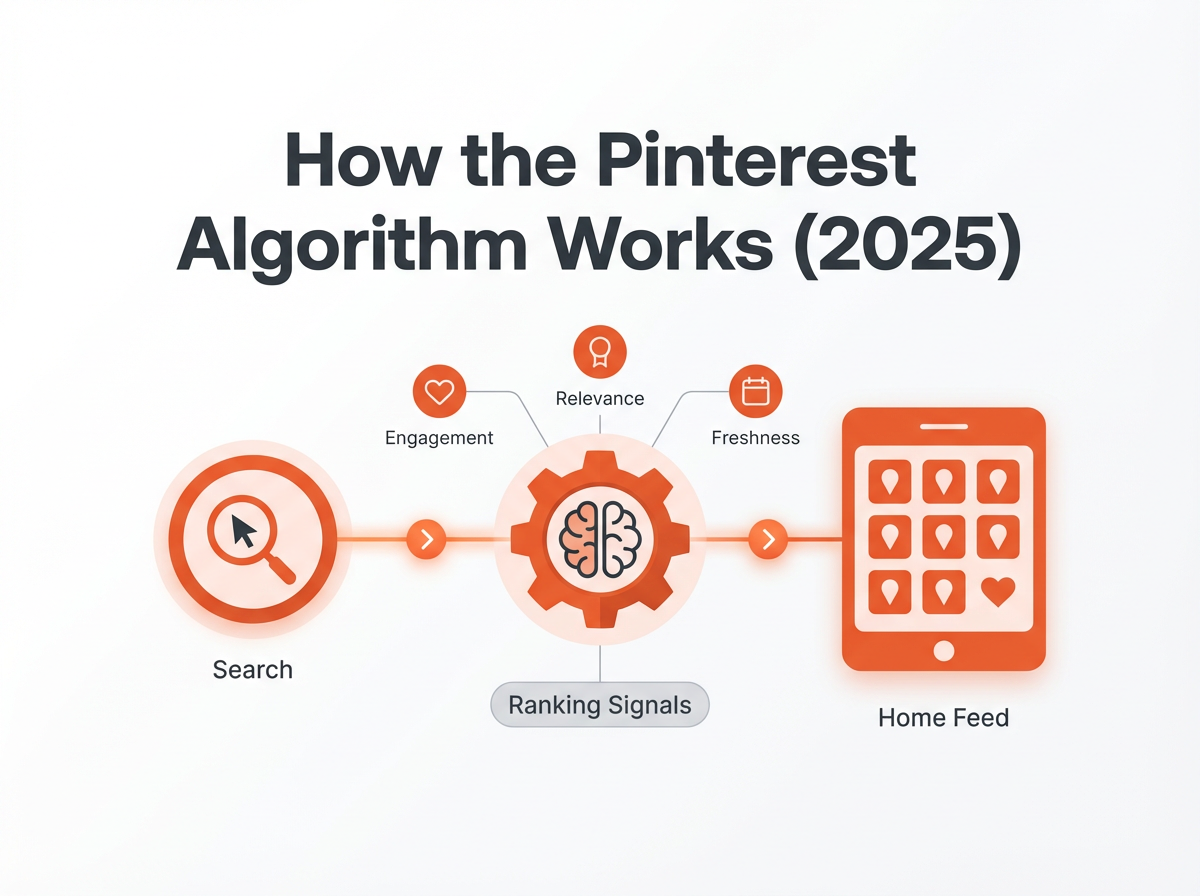
If you’ve ever wondered how does Pinterest algorithm work, here’s the simplest way to think about it: Pinterest is a search-and-discovery engine that tries to predict what each person wants to save, click, or shop for next. The algorithm’s job is to match a user’s intent with the most relevant, highest-quality Pins, based on signals from the user, the Pin, the creator, and the destination (your site or shop).
That’s why Pinterest can feel wildly different from other social platforms. You’re not just “posting to followers.” You’re publishing content that can show up in search results, home feeds, related Pins, boards, and shopping surfaces for months (sometimes years) if it’s optimized well.
And yes, there are times you might feel like the pinterest algorithm change made your reach disappear overnight. We’ll cover what’s really happening there, why people say why is the pinterest algorithm so bad, and what you can do about it without chasing every rumor.
How does the Pinterest algorithm work?

At a high level, Pinterest ranks and distributes Pins in a few key places:
- Home feed (personalized recommendations)
- Search results (keyword- and intent-driven)
- Related Pins / More like this (visual + topic similarity)
- Board feeds (content within boards users follow)
- Shopping surfaces (product Pins, catalogs, “Shop similar”)
To decide what shows where, Pinterest uses ranking systems that evaluate:
- Relevance: Does this Pin match the user’s query or behavior?
- Quality: Is this a high-quality Pin from a trustworthy creator?
- Engagement prediction: How likely is the user to save/click/close?
- Freshness: Is this new, newly relevant, or seasonally timely?
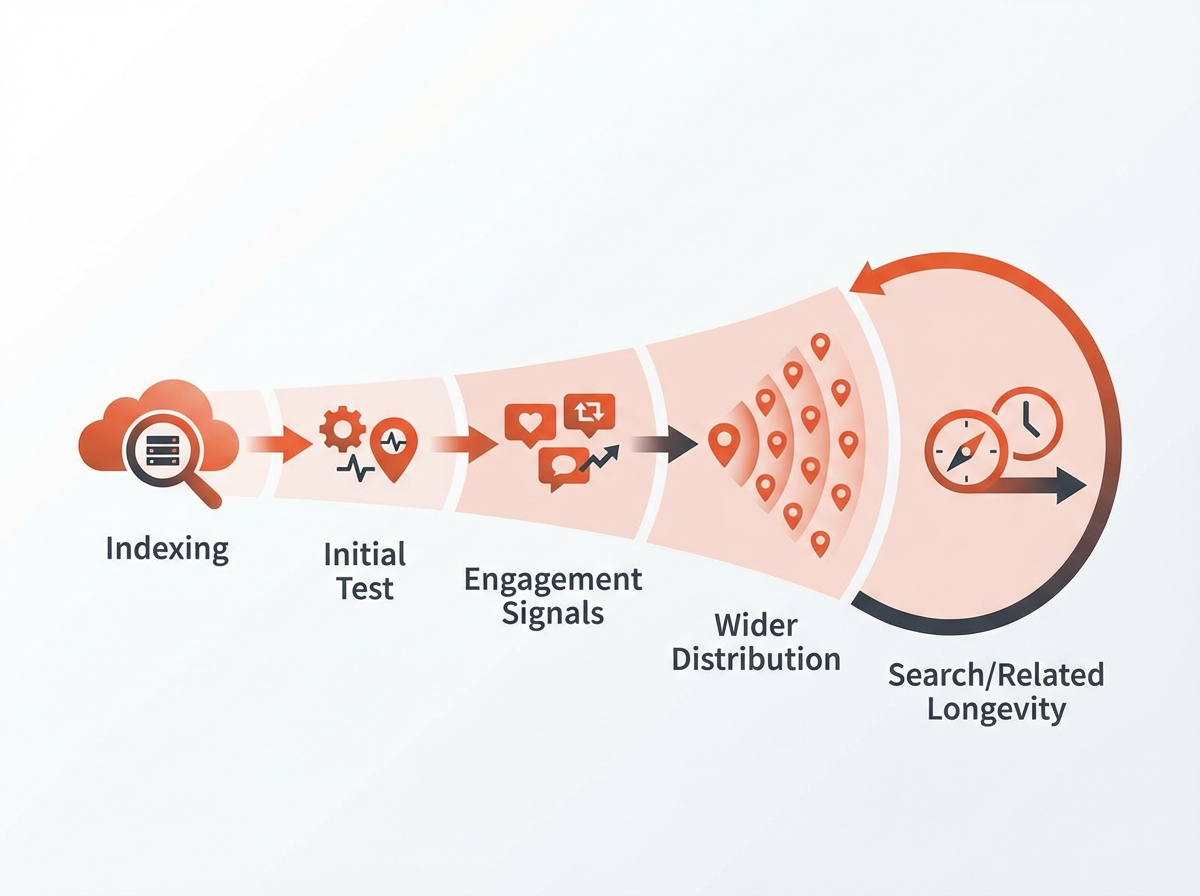
In practice, Pinterest is constantly testing your Pin with small audiences, learning from performance, and then expanding distribution if the signals look good. That’s why some Pins “take off” days or weeks after publishing, Pinterest needed enough data to confidently push it wider.
The three big buckets of ranking signals
Most of what matters falls into three buckets:
- User signals (what the viewer has done and seems to want)
- Pin signals (what the Pin is about and how it performs)
- Creator + domain signals (trust, consistency, destination quality)
1) User signals: Pinterest learns your intent
Pinterest tracks behavior to understand what each person is planning, researching, or shopping for. Common user signals include:
- Searches (keywords, phrasing, refinements)
- Saves (what topics they collect)
- Clicks and outbound clicks (what they actually explore)
- Dwell time (how long they view a Pin or destination)
- Hide/report actions (strong negative feedback)
- Seasonality patterns (holiday, back-to-school, wedding season, etc.)
So if someone starts searching “capsule wardrobe winter,” Pinterest quickly shifts their home feed toward winter outfits, closet organization, neutral color palettes, and shopping Pins, because it’s trying to be helpful, not random.
2) Pin signals: what your Pin communicates (even before engagement)
Pinterest reads your Pin like a package of metadata + visuals. Key Pin signals include:
- Keywords in title, description, and on-image text
- Visual content (objects, style, colors, composition)
- Topic categorization (how Pinterest classifies it)
- Engagement rates (saves, clicks, close-ups, outbound clicks)
- Freshness (new creative, new URL, new angle, timely relevance)
This is why two Pins linking to the same blog post can perform totally differently. Pinterest may understand one Pin clearly (great keyword alignment + clear visual promise) and be confused by the other (vague text, mismatched image, weak topic signals).
3) Creator + domain signals: trust and consistency
Over time, Pinterest builds confidence in creators and websites. Signals can include:
- Account history and policy compliance
- Consistency of publishing and topic focus
- Engagement quality across Pins
- Destination quality (page speed, mobile friendliness, low bounce, helpful content)
- Spam indicators (repetitive Pins, misleading claims, thin pages)
If people click your Pins and quickly bounce because the page is slow, full of popups, or doesn’t match the Pin promise, Pinterest learns not to prioritize your content. It’s not personal—it’s optimization.
How Pinterest knows what to show you (personalization explained)
When you open Pinterest, you’re seeing a personalized mix of content that Pinterest thinks will satisfy your current intent. It’s using a blend of:
- Your recent activity: what you searched, saved, clicked, and watched lately
- Long-term interests: broader categories you consistently engage with
- Similar users: patterns from people with overlapping behavior
- Context: location, language, device type, and seasonal timing
- Content understanding: what it can “read” from images and text
This is also why Pinterest can feel like it “reads your mind.” In reality, it’s just very good at connecting dots between your actions and the content that historically performs well for similar intent.
Search vs. browse: two different modes, same goal
Pinterest has two major discovery modes:
- Search-led discovery: You type a query, Pinterest ranks the best matches.
- Browse-led discovery: Pinterest predicts what you’ll want next and serves it in the home feed.
For creators, this means you need to optimize for both. Strong keywords help you show up in search, while strong creative and engagement help you expand through browse surfaces like home feed and related Pins.
Key factors that influence Pinterest ranking
If you’re focused on pinterest algorithm performance, these are the practical levers you can actually control.
Keyword relevance (Pinterest SEO is still the foundation)
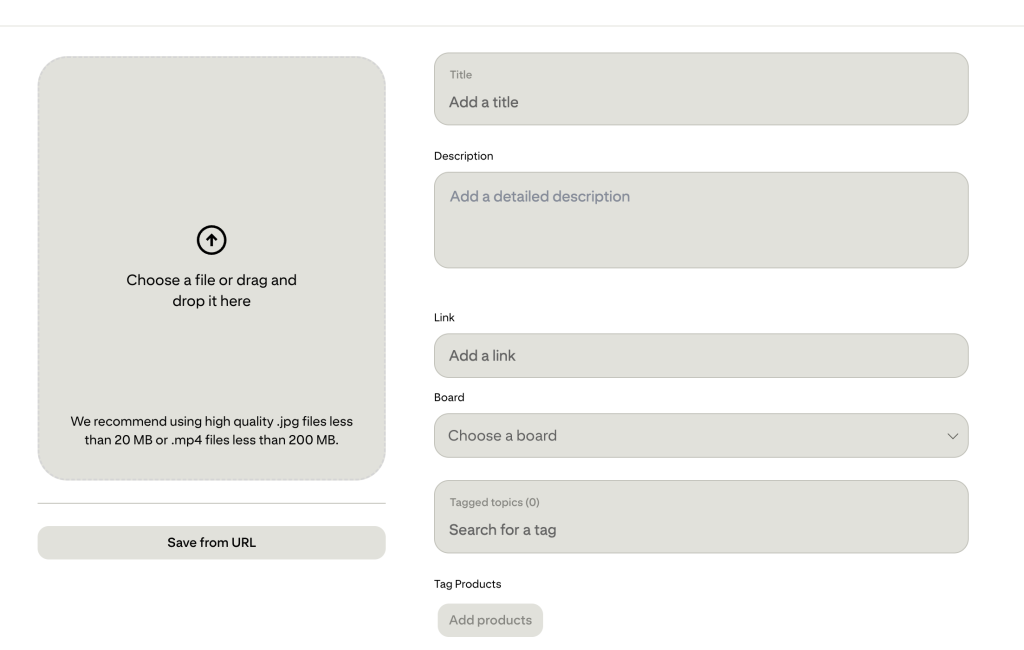
Pinterest is a search engine. That means Pinterest SEO still matters—a lot. You want keywords in:
- Pin title (clear, specific, not clickbait)
- Pin description (natural language, helpful context, related terms)
- Board titles and descriptions (organized by topic, not cute names)
- On-image text (reinforces the promise and topic)
Tip: write like a human, but be specific. “Easy high-protein meal prep for beginners” beats “Healthy ideas you’ll love.”
Visual quality and clarity (Pinterest is a visual prediction engine)
Pinterest uses visual understanding to categorize content and match it to similar Pins. Your creative should make the topic obvious at a glance:
- High-contrast text overlay (easy to read on mobile)
- Clear subject (what is this Pin about?)
- Consistent branding (builds recognition, improves trust)
- Vertical format (commonly performs well in feeds)
Engagement quality (not just more, but better)
Pinterest cares about whether your Pin satisfied the user. Strong signals include:
- Saves: indicates planning and long-term value
- Outbound clicks: indicates real interest and usefulness
- Close-ups: indicates curiosity (but not always enough alone)
Negative signals include quick scroll-past, hides, reports, and clicks that lead to immediate backtracking.
Fresh content (and what “fresh” really means)
Freshness is misunderstood. “Fresh” doesn’t have to mean a brand-new blog post every day. It can mean:
- New Pin creative (new design, new angle) to an existing URL
- New keywords and positioning for the same topic
- New seasonal relevance (republishing with updated creative)
Pinterest tends to reward creators who consistently publish new Pins, test creative variations, and keep content aligned with current searches.
Topic authority (niching helps the algorithm trust you)
If your account pins everything from wedding cakes to crypto to dog training, Pinterest struggles to understand your “lane.” A focused niche improves:
- Recommendation accuracy
- Audience matching
- Long-term distribution
That doesn’t mean you can’t expand. It means you should expand intentionally, building clusters of related topics rather than random categories.
Destination quality (your website can boost—or block—distribution)
Pinterest wants users to have a good experience after the click. If your site is slow, cluttered, or mismatched, your distribution can suffer. Prioritize:
- Fast mobile load times
- Content that matches the Pin promise
- Clear headings, scannable formatting, helpful depth
- Minimal intrusive popups
Pinterest algorithm update vs. “Pinterest algorithm broken”: what’s really going on?
When people say pinterest algorithm broken, they’re usually reacting to one of these situations:
- Distribution reshuffles: Pinterest tests new ranking weights (e.g., more emphasis on freshness or shopping intent).
- Seasonality shifts: demand changes, so impressions drop even if nothing is “wrong.”
- Content saturation: more creators publish in the same niche, increasing competition.
- Quality re-evaluations: Pinterest tightens spam filters (thin content, repetitive Pins, misleading claims).
- Attribution lag: analytics can delay or reclassify traffic sources.
A real pinterest algorithm update can absolutely change what works best, but most “my reach died” moments are a mix of competition + creative fatigue + keyword mismatch + seasonal demand.
Why is the Pinterest algorithm so bad (from a creator perspective)?
That phrase usually means: “I did the same thing as before, and it stopped working.” Pinterest can feel harsh because:
- It’s less follower-dependent, so you don’t get guaranteed distribution.
- It’s intent-driven, so trends shift quickly with seasons and searches.
- It tests content in waves, so results can look inconsistent day to day.
The upside is that when you align with intent and quality, Pinterest can send steady traffic long after you publish.
How to beat the Pinterest algorithm (without gimmicks)
If you’re trying to “beat” the algorithm, the real goal is to make it easy for Pinterest to understand your content and confidently show it to the right people. Here are the strategies that consistently work.
Build a keyword system you can repeat
Do this before you design Pins:
- Start with a core keyword (example: “small kitchen organization”).
- Expand with Pinterest search suggestions (the autocomplete bar is gold).
- Collect modifiers: “for apartments,” “on a budget,” “IKEA,” “DIY,” “without drilling,” “under sink,” etc.
- Create 5–10 Pin angles using those modifiers.
This helps you publish multiple fresh Pins to the same content while staying relevant and avoiding spammy repetition.
Create multiple Pin designs per URL (fresh creative wins)
Instead of making one Pin and hoping for the best, create variations:
- Different headline hooks (how-to, checklist, mistakes, before/after)
- Different hero images (close-up, wide shot, step-by-step collage)
- Different audience framing (beginners, small spaces, busy moms, etc.)
Sometimes the “same” content needs a different wrapper for Pinterest to find the right audience.
Match the Pin promise to the landing page (tight alignment)
This is a big one. If your Pin says “7-day meal prep plan,” the landing page should immediately deliver that plan—above the fold if possible. Misalignment leads to quick bounces, which can reduce distribution over time.
Use boards strategically (they still matter, just differently)
Boards help Pinterest understand your topics and categorize your Pins. Best practices:
- Create boards around clear search topics (not vague lifestyle labels).
- Write board descriptions with natural keywords.
- Pin to the most relevant board first.
- Avoid dumping everything into one “My Favorites” board.
Post consistently, but prioritize quality over volume
Consistency matters because Pinterest learns from your ongoing performance. But posting more low-quality Pins can backfire. A practical approach:
- Publish a steady cadence you can sustain.
- Focus on fresh creative and clear keywords.
- Review performance monthly and double down on what’s working.
Improve your “creator trust” signals
To strengthen creator and domain confidence:
- Claim your website and enable rich Pins if applicable.
- Keep branding consistent across Pins.
- Avoid sensational or misleading headlines.
- Update older posts that still get clicks (keep them useful).
Design Pins for saves (not just clicks)
Saves are a strong Pinterest-native signal because they indicate planning. To encourage saves:
- Create evergreen resources (checklists, templates, step-by-steps)
- Use clear outcomes (“Before/After,” “10 Ideas,” “Complete Guide”)
- Make the Pin feel like something worth keeping
What to do when reach drops after a Pinterest algorithm change
If you suspect a pinterest algorithm change hit your account, don’t panic-edit everything at once. Use a simple diagnostic process.
Step 1: Identify what actually dropped
- Impressions down: ranking/distribution changed or demand shifted.
- Outbound clicks down but impressions stable: creative mismatch or weaker call-to-action.
- Saves down: content may be less “collectible,” or the topic is less planning-oriented.
Step 2: Check seasonality and trend timing
Some niches are extremely seasonal (holidays, school, gardening, fitness). Compare performance year-over-year if you can. A “drop” might be normal demand cooling.
Tip: Checkout their trends page to see what’s coming on the way.
Step 3: Refresh creative before you rewrite content
Often, the fastest win is new Pin creative with sharper keywords and a clearer promise. Create 5–10 new Pins for your top pages and test for 2–4 weeks.
Step 4: Audit your landing pages for experience issues
If Pinterest is sending fewer clicks, it may be protecting users from poor experiences. Audit:
- Mobile speed
- Intrusive interstitials/popups
- Above-the-fold relevance
- Broken links or heavy ad load
Step 5: Simplify and refocus your niche signals
If your content is scattered, Pinterest may not know who to show it to. Tighten boards, keywords, and publishing around a few core categories for 60–90 days.
How much does Pinterest pay for 1000 views?
Pinterest typically does not pay creators just for getting 1,000 views (impressions) in the way some platforms pay for video views. Pinterest is primarily a traffic and commerce platform—most creators earn money indirectly by turning Pinterest traffic into:
- Ad revenue on their website (RPM varies widely)
- Affiliate commissions
- Product sales (digital or physical)
- Lead generation (email signups, client inquiries)
- Brand partnerships
So the real answer is: it depends on how you monetize the traffic that comes from those views. 1,000 Pinterest impressions might produce anything from 0 clicks to dozens of clicks depending on niche, creative, and intent. And those clicks might be worth very different amounts depending on your monetization model.
When can Pinterest pay creators directly?
Pinterest has experimented with creator incentive programs and other monetization features over time, and availability varies by region and eligibility. If you’re looking for direct payouts, check your account’s creator tools and official Pinterest announcements. But for most businesses, the most reliable “Pinterest payout” is still: Pinterest → your site/shop → your revenue.
Common myths about the Pinterest algorithm (that waste your time)
Let’s clear up a few things that cause unnecessary stress.
Myth: You’re shadowbanned if impressions drop
Most drops are explained by seasonality, competition, creative fatigue, or a shift in what Pinterest is prioritizing. Focus on controllables: keywords, creative testing, and destination quality.
Myth: You have to Pin the same URL to 20 boards
Over-distribution can look spammy and isn’t necessary. Prioritize relevance. One great board match is better than 20 weak ones.
Myth: Only new accounts can go viral
Older accounts can perform incredibly well, especially with strong domain trust. What matters is publishing fresh creative and staying aligned with current searches.
Myth: Pinterest SEO is dead
Pinterest SEO evolves, but it’s not dead. If anything, as Pinterest leans into shopping and intent, clarity and relevance become even more important.
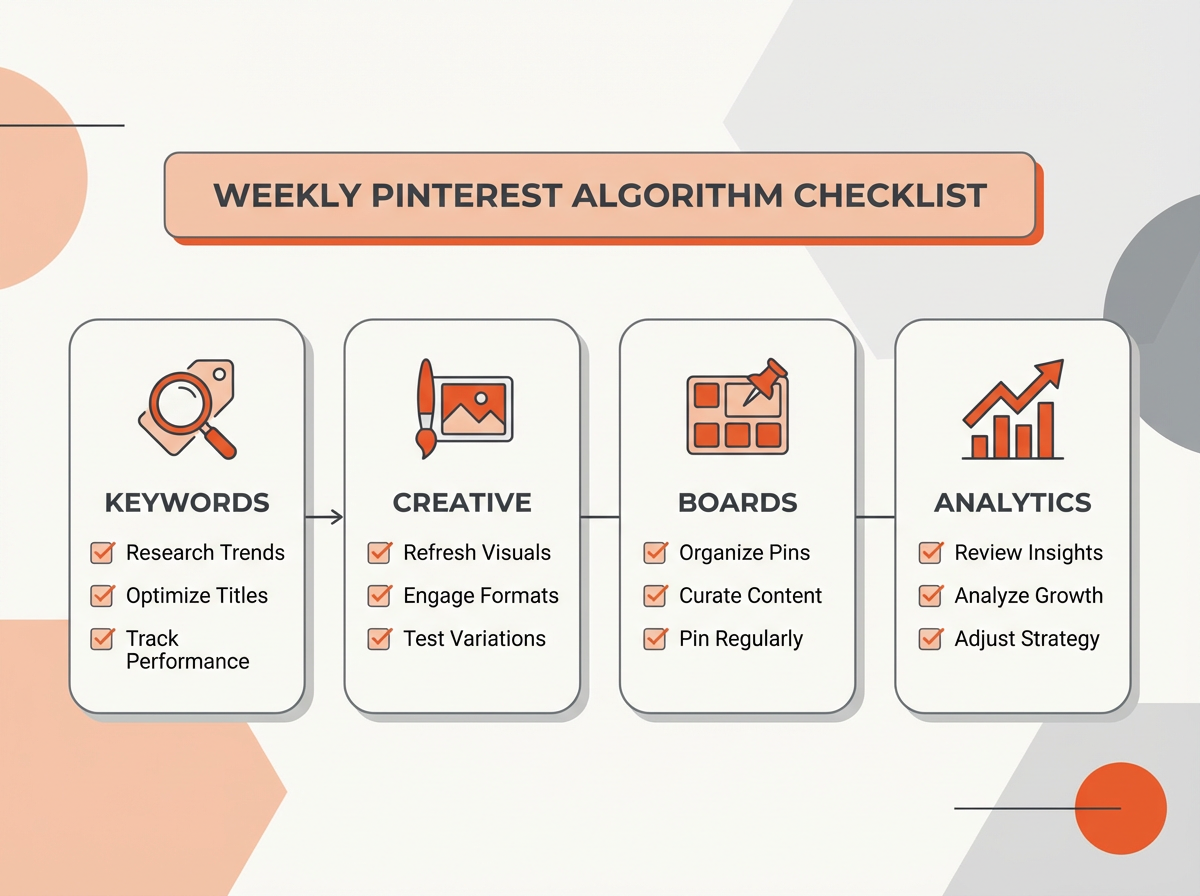
A practical Pinterest algorithm checklist (do this weekly)
If you want a simple routine that supports algorithm performance without overthinking it, use this checklist:
- Publish fresh Pins for your best content (new designs + new angles).
- Write specific titles that match real searches.
- Update descriptions with natural related keywords (don’t keyword-stuff).
- Pin to relevant boards first to help categorization.
- Review top performers and create 3–5 variations of winners.
- Check landing pages for speed and promise-match.
- Plan seasonal content 6–10 weeks ahead (or earlier for major holidays).
Frequently Asked Questions (FAQs)
How does the Pinterest algorithm work?
The Pinterest algorithm ranks Pins based on relevance to a user’s intent (searches and behavior), Pin quality (keywords + visuals + engagement), and creator/domain trust. It tests content, learns from engagement, and expands distribution when signals are strong.
How does Pinterest know what to show you?
Pinterest personalizes recommendations using your recent searches, saves, clicks, and viewing behavior, plus long-term interests, seasonality, and similarity to other users’ patterns. It also “reads” Pin images and text to classify topics.
How to beat the Pinterest algorithm?
You don’t beat it—you align with it: use strong Pinterest SEO, publish fresh creative consistently, match Pin promises to landing pages, focus your niche, and improve destination experience (speed, relevance, usability).
How much does Pinterest pay for 1000 views?
Pinterest generally doesn’t pay per 1,000 views by default. Most earnings come indirectly through ads, affiliate links, product sales, leads, or partnerships generated from Pinterest-driven traffic.
Final Thoughts
If you take one thing away from this guide on how does Pinterest algorithm work, let it be this: Pinterest rewards clarity. Clear keywords, clear visuals, clear promises, and clear value on the landing page. When you give Pinterest confidence about what your content is and who it’s for, the platform can do what it does best—connect your Pins with people actively looking for them.
If you want help turning this into an actionable plan, start by auditing your top 10 pages, creating 5 fresh Pins for each with distinct keyword angles, and tracking which designs earn saves and outbound clicks. Then repeat what works.
Next step: Pick one topic you want to own on Pinterest in 2026, build 3–5 keyword-focused boards around it, and publish fresh creative weekly for 60 days. You’ll be surprised how quickly the algorithm starts working with you instead of against you.