
Binary is a way to write numbers using only 0 and 1. Each digit gets its value from its position. For example, 101 in binary means 5 in decimal because it contains one 4, no 2, and one 1.
I’ll start with those place values, then show you how to count, convert numbers in either direction, and check your answers. You won’t need a calculator to follow the examples.
Key takeaways
- Binary is base 2, so each digit is either 0 or 1
- Whole-number places start at 1 on the right and double as you move left
- To convert binary to decimal, add the places marked with a 1
- When converting by repeated division, read the remainders from bottom to top
- Eight bits have 256 possible patterns; as an unsigned integer, their range is 0–255
What is the binary number system?
The binary number system uses two digits: 0 and 1. The decimal system you use for everyday counting has ten digits: 0 through 9.
Both systems use place value. In decimal, the columns are ones, tens, hundreds, and so on. In binary, they are ones, twos, fours, eights, and so on.
| Number system | Allowed digits | Place values, starting on the right | How it writes five |
|---|---|---|---|
| Decimal, or base 10 | 0–9 | 1, 10, 100, 1,000 | 5 |
| Binary, or base 2 | 0 and 1 | 1, 2, 4, 8 | 101 |
The quantity stays the same. Five objects are still five objects, whether you write the number as 5 in decimal or 101 in binary.
A small base label removes confusion: 101₂ means binary, while 5₁₀ means decimal. So 10₂ equals 2₁₀, not ten. Throughout this guide, an unlabelled ordinary number is decimal unless the surrounding text says otherwise.
Three terms are worth keeping handy:
- Bit: one binary digit
- Byte: a group of eight bits
- Unsigned integer: a whole-number value that is zero or positive
A binary number doesn’t have to contain eight bits. You can write five as 101₂ or, using an eight-bit field, 00000101₂. Cornell’s introduction to number representation explains these place-value and storage distinctions.
How binary place value works
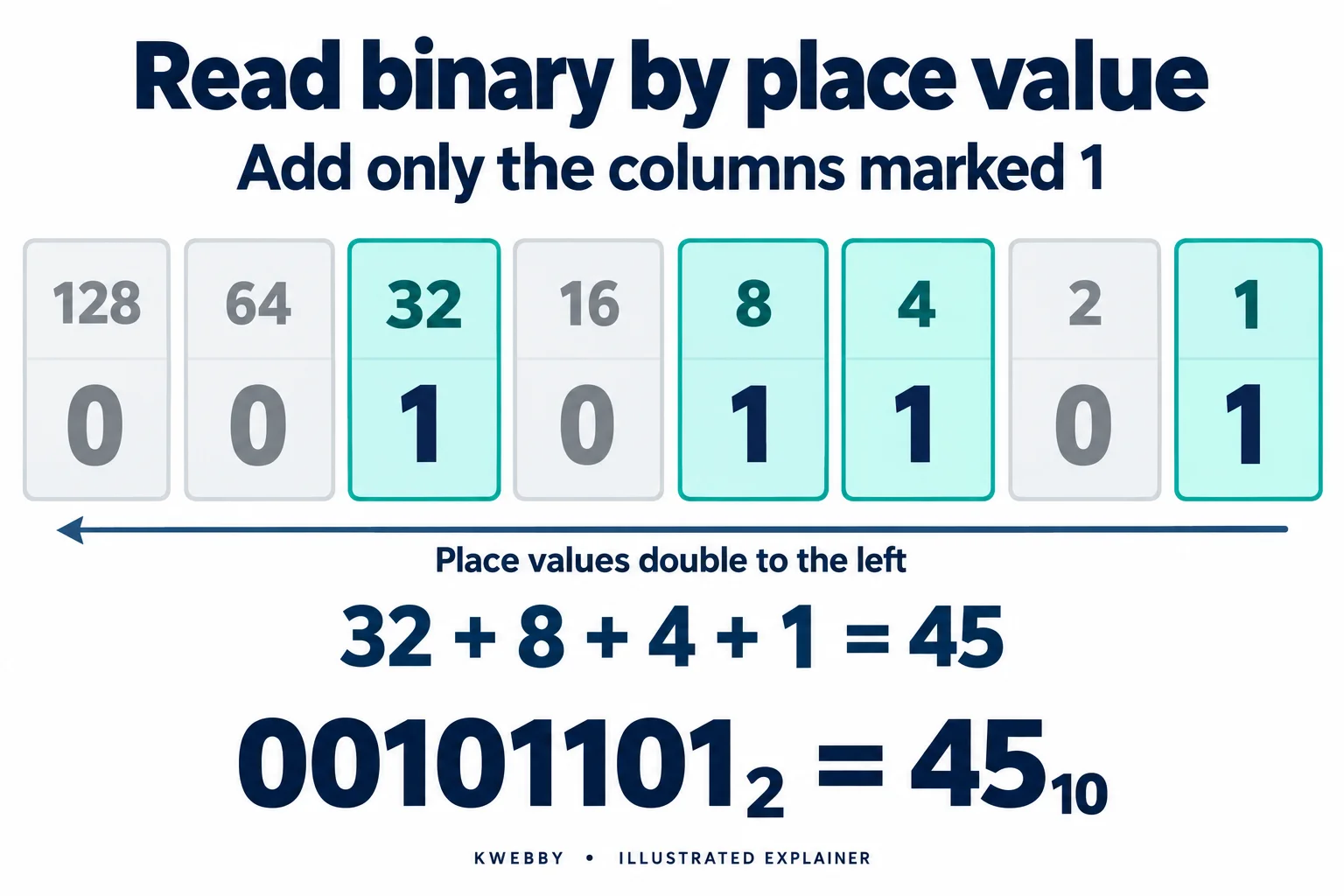
Start on the right with 1. Each move left doubles the value: 1, 2, 4, 8, 16, 32, 64, 128.
A bit set to 1 includes its column in the total. A bit set to 0 leaves that column out.
Here is the eight-bit pattern 00101101:
| 128 | 64 | 32 | 16 | 8 | 4 | 2 | 1 |
|---|---|---|---|---|---|---|---|
| 0 | 0 | 1 | 0 | 1 | 1 | 0 | 1 |
The rightmost column is the ones place. The columns marked 1 are 32, 8, 4, and 1.
00101101₂ = 32 + 8 + 4 + 1 = 45₁₀
You can drop the two leading zeroes and write 101101₂. For this unsigned value, nothing changes.
If you know powers, these columns are 2⁰, 2¹, 2², 2³, and so on. You don’t need to memorise that notation yet. Doubling from 1 gets you the same chart.
How to count in binary
Binary begins 0, 1, 10, 11, 100. You create a new column sooner than in decimal because a column can hold only 0 or 1.
When you add 1 to a column that already contains 1, write 0 and carry 1 into the next column. That carry may continue across several columns.
Watch what happens around decimal seven:
- 110₂ is 6
- 111₂ is 7
- 1000₂ is 8
- 1001₂ is 9
The same pattern appears at fifteen: 1111₂ + 1₂ = 10000₂. All four existing columns reset to 0, and the carry creates a new leftmost 1.
Binary numbers from 0 to 31
This chart leaves out unnecessary leading zeroes. A new digit appears at decimal 2, 4, 8, and 16.
| Decimal | Binary |
|---|---|
| 0 | 0 |
| 1 | 1 |
| 2 | 10 |
| 3 | 11 |
| 4 | 100 |
| 5 | 101 |
| 6 | 110 |
| 7 | 111 |
| 8 | 1000 |
| 9 | 1001 |
| 10 | 1010 |
| 11 | 1011 |
| 12 | 1100 |
| 13 | 1101 |
| 14 | 1110 |
| 15 | 1111 |
| 16 | 10000 |
| 17 | 10001 |
| 18 | 10010 |
| 19 | 10011 |
| 20 | 10100 |
| 21 | 10101 |
| 22 | 10110 |
| 23 | 10111 |
| 24 | 11000 |
| 25 | 11001 |
| 26 | 11010 |
| 27 | 11011 |
| 28 | 11100 |
| 29 | 11101 |
| 30 | 11110 |
| 31 | 11111 |
Four larger boundaries follow the same rule:
| Decimal | Binary |
|---|---|
| 127 | 1111111 |
| 128 | 10000000 |
| 255 | 11111111 |
| 256 | 100000000 |
Counting includes zero. That’s why 32 different five-bit patterns cover the values 0–31, rather than 1–32.
How to convert binary to decimal
I find it helpful to write the place values above the digits before doing any arithmetic.
- Start at the rightmost digit and label its place 1
- Moving left, label the remaining places 2, 4, 8, 16, and so on
- Keep only the place values with a 1 beneath them
- Add those values
For 101101₂, the full calculation is:
1 × 32 + 0 × 16 + 1 × 8 + 1 × 4 + 0 × 2 + 1 × 1 = 45
You can shorten that to 32 + 8 + 4 + 1 = 45 once the column positions are clear.
Try a second number: 100101₂. Its 1s sit in the 32, 4, and 1 columns, so the answer is 37.
Now try 11010₂ yourself. The included places are 16, 8, and 2, giving 26. The zero on the right contributes nothing, but it still holds the ones position. Don’t skip zeroes when labelling the columns.
How to convert decimal to binary
You have two useful methods. One builds the number from powers of two. The other repeatedly divides by two and records what is left over.
Method 1: Build the number from powers of two
Let’s convert decimal 45.
Choose the largest power of two that fits into 45, which is 32. Subtract it, then work down through every smaller place.
| Place value | What to do | Bit | Amount left |
|---|---|---|---|
| 32 | Take 32 from 45 | 1 | 13 |
| 16 | 16 is too large | 0 | 13 |
| 8 | Take 8 from 13 | 1 | 5 |
| 4 | Take 4 from 5 | 1 | 1 |
| 2 | 2 is too large | 0 | 1 |
| 1 | Take the remaining 1 | 1 | 0 |
Read the bit column from top to bottom: 101101₂.
Keep a 0 for every place you skip. Leaving out the 16 or 2 column would move the other digits into the wrong positions.
Method 2: Divide by two and keep the remainders
Divide the whole number by 2. Record the whole-number quotient and remainder, then divide the quotient again. Stop when the quotient reaches zero.
| Division | Whole-number quotient | Remainder |
|---|---|---|
| 45 ÷ 2 | 22 | 1 |
| 22 ÷ 2 | 11 | 0 |
| 11 ÷ 2 | 5 | 1 |
| 5 ÷ 2 | 2 | 1 |
| 2 ÷ 2 | 1 | 0 |
| 1 ÷ 2 | 0 | 1 |
Read the remainders from bottom to top: 101101.
The first remainder belongs to the rightmost, or ones, place. That’s why reading downward gives the wrong order. Cornell’s number-system lesson covers this repeated-division method.
Zero is a simple special case: decimal 0 is binary 0.
Whichever method you choose, check the answer by adding its place values. Here, 32 + 8 + 4 + 1 returns the original 45.
Binary addition, with a carry example
Binary addition uses four basic rules:
- 0 + 0 = 0
- 0 + 1 = 1
- 1 + 0 = 1
- 1 + 1 = 10₂: write 0 and carry 1
A column can also receive a carry from its neighbour. Then 1 + 1 + 1 = 11₂: write 1 and carry 1.
Let’s add 1101₂ + 1011₂. Work from right to left:
- Ones: 1 + 1 = 10₂. Write 0 and carry 1
- Twos: 0 + 1 + the carry = 10₂. Write 0 and carry 1
- Fours: 1 + 0 + the carry = 10₂. Write 0 and carry 1
- Eights: 1 + 1 + the carry = 11₂. Write 1 and carry 1
- Put the final carry in a new sixteens column
The result is 11000₂. Check it in decimal: 13 + 11 = 24, and 16 + 8 = 24.
This example lets the answer grow to five bits. A fixed four-bit storage field cannot hold unsigned 24; the available width matters when you’re doing arithmetic in a program.
Bits, bytes and the biggest number you can store
There is no largest binary number if you can keep adding digits. A fixed number of bits, however, gives you a fixed number of patterns.
For an unsigned integer with n bits:
- Number of patterns: 2ⁿ
- Smallest value: 0
- Largest value: 2ⁿ − 1
| Width | Different patterns | Unsigned range |
|---|---|---|
| 4 bits | 16 | 0–15 |
| 8 bits | 256 | 0–255 |
| 16 bits | 65,536 | 0–65,535 |
Zero uses one of the patterns, so the highest unsigned eight-bit value is 255, not 256. All eight bits are 1: 128 + 64 + 32 + 16 + 8 + 4 + 2 + 1 = 255. Oxford’s binary-number teaching note compares these widths and interpretations.
What about negative numbers?
The format tells you how to interpret the bits. A common signed format is two’s complement.
With eight-bit two’s complement, the range is −128 to 127. The pattern 11111111 means −1 in that format. Read the same eight bits as unsigned, and they mean 255.
So a leading 1 doesn’t always mean a negative number. You first need to know the width and the representation. Cornell’s two’s-complement notes explain the signed rules in more detail.
How binary represents text
Text needs a character encoding: a set of rules that connects characters to stored values.
Text to binary converter
Text–Binary Translator
Uses UTF-8, including accented letters and emoji. Binary input must contain complete 8-bit bytes, either together or separated by spaces, tabs or new lines.
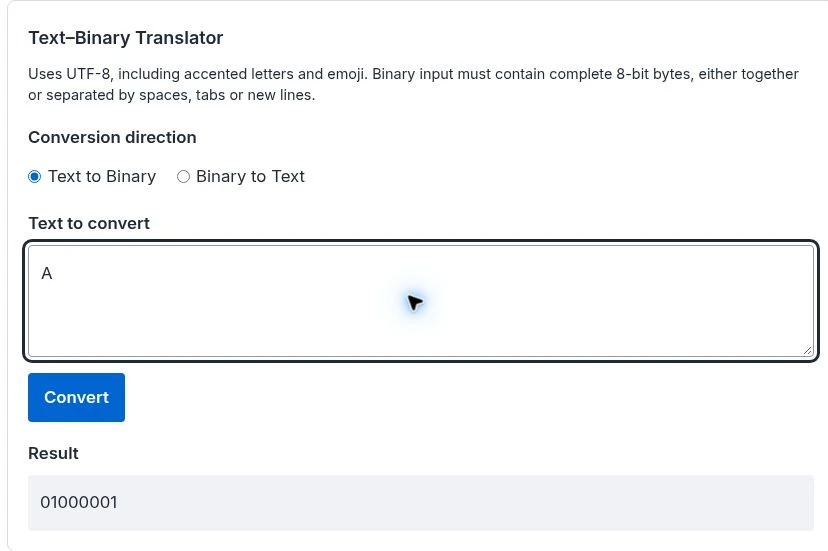
For example, capital A has ASCII value 65. Written in an eight-bit byte, that value is 01000001.
RFC 20 calls ASCII “standard 7-bit ASCII” and describes placing it in an eight-bit byte with a leading zero. That distinction matters: ASCII itself is a seven-bit code. Read the ASCII specification.
Using that byte notation, Hello! becomes:
01001000 01100101 01101100 01101100 01101111 00100001
The spaces separate bytes for readability. They aren’t addition signs, and they don’t represent extra spaces in the original text.
Also watch the difference between a number and a written digit. The integer 5 can be written as 101₂. The text character “5” has ASCII value 53, or 00110101 in an eight-bit byte.
For text beyond ASCII, UTF-8 is a common encoding. It uses one to four bytes per Unicode scalar value. For example, é written as the single Unicode character U+00E9 becomes the two UTF-8 bytes 11000011 10101001. Some visible symbols contain multiple code points, so “one symbol equals one byte” isn’t a safe rule. RFC 3629 defines UTF-8.
A string of bits only becomes meaningful text when you know how it was encoded. Encoding also isn’t encryption: changing text into binary digits doesn’t make it secret.
Binary to text converter
Text–Binary Translator
Uses UTF-8, including accented letters and emoji. Binary input must contain complete 8-bit bytes, either together or separated by spaces, tabs or new lines.
The worked examples above state their encoding explicitly and can be followed independently of the conversion widgets.
Why computers use binary
Electronic circuits can distinguish physical states, such as different voltage levels. We use 0 and 1 to describe two logical states, then combine bits to represent more information. The exact physical implementation depends on the hardware. CS Unplugged explains the underlying idea.
The format gives those bits meaning:
- A numeric format can interpret them as a quantity
- A character encoding can interpret them as text
- An image format can use them to represent colour information
Thinking of a bit as a switch is a useful starting point. Just remember that the printed 0s and 1s describe stored information; they aren’t tiny written digits inside the computer.
Try these binary practice questions
Try first, then check the answers below. A place-value row of 32, 16, 8, 4, 2, 1 is enough for the conversion questions.
- Convert 11010₂ to decimal
- Convert decimal 19 to binary
- What comes immediately after 1111₂?
- Add 101₂ and 11₂
- What is the largest unsigned eight-bit integer?
- Do 00101₂ and 101₂ have the same unsigned value?
Answers and explanations
- 26. Add 16 + 8 + 2
- 10011₂. The included places are 16, 2, and 1
- 10000₂. The carry moves decimal 15 to decimal 16
- 1000₂. In decimal, the calculation is 5 + 3 = 8
- 255. All eight bits are 1; there are 256 values when zero is included
- Yes, both equal 5. Leading zeroes don’t change an unsigned whole-number value
If an answer doesn’t match, check column positions first. Then check carries or, for repeated division, the direction you read the remainders.
Frequently asked questions
Is 1010 binary or decimal?
It can be either. In base 2, 1010₂ means decimal 10. In base 10, 1010 means one thousand and ten. A base label or clear context tells you which reading to use.
What does 11111111 mean?
As an unsigned eight-bit integer, it means 255. In eight-bit two’s complement, it means −1. Other formats can assign the same bits other meanings.
Can binary numbers have a fractional part?
Yes. The places after the binary point are 1/2, 1/4, 1/8, and so on. For example, 101.01₂ is 4 + 1 + 1/4, or 5.25 in decimal. Cornell’s binary-fraction notes explain this extension of place value.
Does a leading zero change a binary number?
For unsigned whole numbers, no. Both 101₂ and 00101₂ equal 5. When working with a stored format, also check its required width and interpretation.
How do I explain binary to a child?
Make four cards labelled 8, 4, 2, and 1, with 1 on the right. Show a card to include its value and turn it over to leave it out. Showing 4 and 2 makes 6. Write a 1 for each visible card and a 0 for each hidden card: 0110₂.
Is binary code a programming language?
Binary is a way to represent information. A sequence of bits could encode a number, a text character, or a machine instruction. Its format and context tell you how to read it.
Final thoughts
Start with the place values: 1, 2, 4, 8, and so on. Once you can identify the columns marked 1, converting a binary whole number becomes an addition problem.
Try converting 19 to binary, then convert your answer back. That round trip gives you a simple way to catch mistakes without relying on a tool.
If you want to put the same idea into code, see how to convert a number to binary in Python.