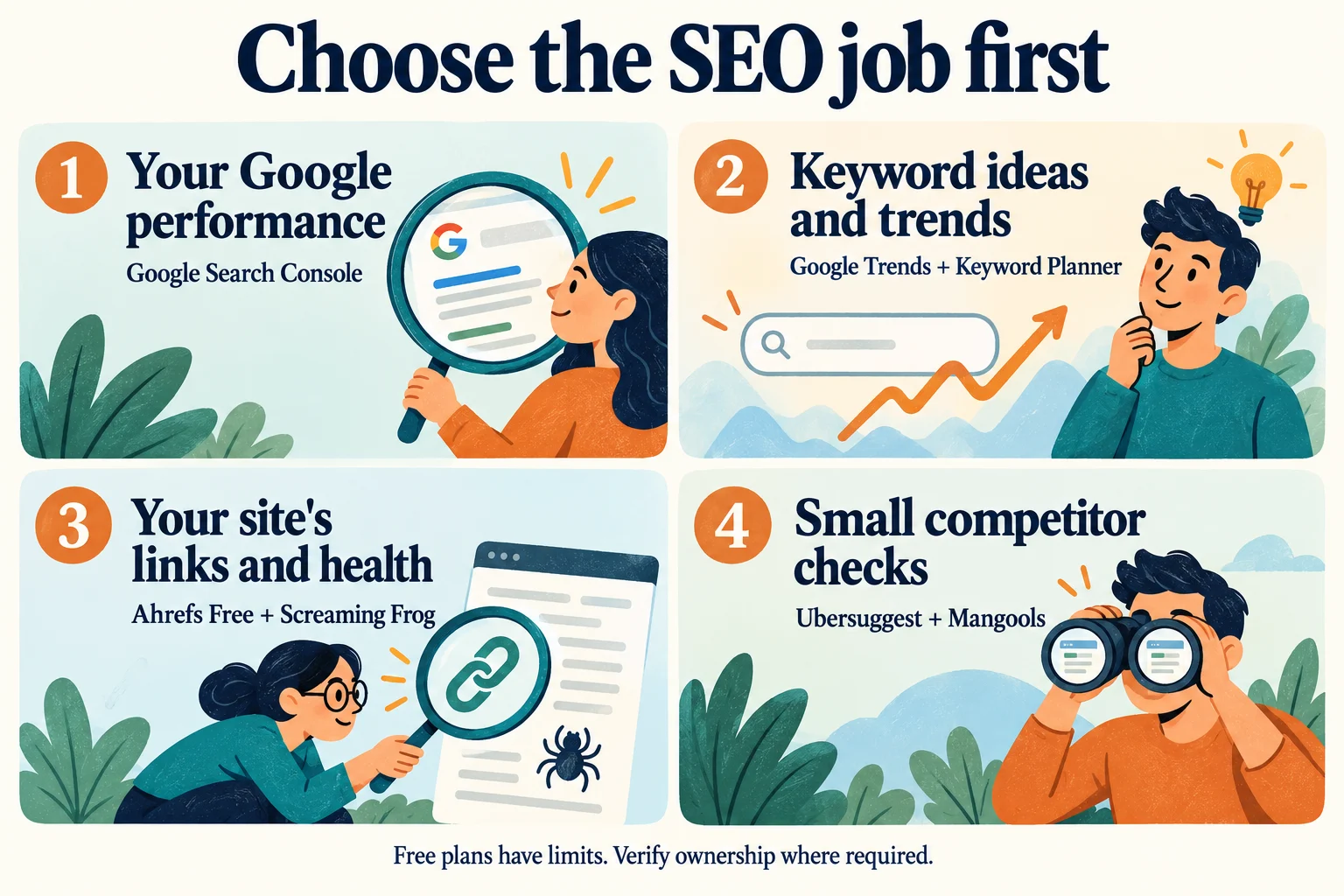
If you want free Semrush alternatives, I’d start with Google Search Console for your own site’s search performance, Ahrefs Free for verified-site analysis, and Screaming Frog for a small technical crawl. Add a keyword research tool when you know what question you need it to answer.
That combination can cover useful SEO work without a large subscription. The tradeoff is that you move between tools, work within their limits, and assemble the findings yourself.
If your main job is researching competitors or reporting on several clients, the decision changes. Below, I’ll separate the ongoing free options from trials, explain their practical limits, and show when a paid alternative may save you time.
Key Takeaways
- Start with the work you need to finish: measuring your site, finding topics, auditing pages, or researching competitors
- Search Console reports on your Google search performance; it doesn’t open a competitor’s private data
- Ahrefs Free’s Site Explorer and Site Audit require website ownership verification
- Screaming Frog’s free crawler stops at 500 URLs per crawl
- Ubersuggest and Mangools offer continuing free access with limits; a free trial is a separate arrangement
- Check exports, tracking frequency, seats and billing terms before paying for more capacity
Decide What You Need to Replace in Semrush
Before opening another pricing page, write down the task you actually use Semrush for. “I need an SEO tool” is a much harder buying decision than “I need to find broken links on my 80-page website.”
I would answer three questions:
- Whose website are you analysing? Your own site has free options that require verification. Researching someone else’s domain needs a tool that explicitly supports that use.
- How much data do you need? A handful of keyword ideas is different from exporting thousands of rows or tracking several countries every day.
- What must you deliver? A personal action list, a downloadable spreadsheet and a scheduled client report have different requirements.
For me, the useful comparison is the cost of completing that task, including the time spent moving data around. A free plan that fits a small project can become awkward when you repeat the process for ten clients.
Free Tools for Understanding Your Own Website
Google Search Console for Your Google Search Performance
Google Search Console is my starting recommendation when you want to understand how your own website appears in Google. Google’s free service covers search traffic, indexing issues and links to your site.
It helps you investigate the queries and pages already producing impressions and clicks. Access is tied to the property and its permissions, so you cannot enter any competitor’s address and see their Search Console report.
Here’s a useful first question: which important pages are getting visibility without attracting many clicks? Review the query, the page’s purpose and the result shown to searchers before deciding whether the title or content needs work.
Google’s Performance report guidance explains its metrics and filters. Keep the same date range, country, device and search type when comparing results. An average position is a summary across impressions, not a promise that everyone sees one fixed ranking.
The limit is scope. Search Console helps you understand your site’s observed performance. It doesn’t replace a market-wide keyword database or a competitor research subscription.
Ahrefs Free for Verified-Site Links and Audits
Ahrefs Free is the current name for the account previously called Ahrefs Webmaster Tools. It includes limited continuing access, rather than a trial that expires after a week.
The useful SEO distinction is ownership. Site Explorer and Site Audit are available for websites you can verify. You can investigate your site’s links and technical issues, but that free access doesn’t give you unrestricted Site Explorer research on competitors.
Ahrefs’ current free-account documentation lists 5,000 crawl credits per project each month and up to 1,000 backlinks and keywords visible at once in Site Explorer.

I’d use this alongside Search Console. One gives you Google’s view of your search performance; the other helps you investigate your verified site’s link profile and crawl findings. Check important issues on the actual page before turning an automated warning into a development task.
Free Options for Keyword Ideas and Search Demand
Google Trends for Direction and Seasonality
Google Trends is useful when your question is about timing or relative interest. For example, you might want to compare two topic ideas or see whether interest in a product normally rises before a particular season.
Its numbers need careful reading. Google’s explanation of Trends data says interest is normalised for the selected time and location and scaled from 0 to 100. A score of 100 isn’t 100 searches, and a zero can reflect insufficient search volume.
Keep the region, time window and search settings consistent when comparing terms. Then ask whether the pattern helps you decide when to publish, what language to use, or which idea deserves more investigation.
I wouldn’t use a rising line alone to justify a new article. You still need a relevant audience and a page that answers the searcher’s question. Trends is helpful context, but it doesn’t supply a complete list of a competitor’s ranking keywords.
Google Keyword Planner for Ideas With an Advertising Caveat
Google Keyword Planner is a free resource within Google Ads for discovering keyword ideas and estimating search demand. It can be useful for SEO research, especially when you already have access to an Ads account.
Don’t assume that means anonymous, no-setup access. Google’s current instructions say you must complete account setup, including billing information, to access basic keyword-idea features. Review what any setup screen asks you to activate before proceeding.
Also keep the metrics straight. The Competition column describes advertisers, not how difficult it will be to rank an ordinary web page organically. Bid estimates and campaign forecasts are advertising measures too.
Use its suggestions to build a shortlist, then inspect the search results and decide what people want. A phrase asking how to solve a problem may need a guide; a phrase naming a service and a town may need a relevant service page.
Use Screaming Frog for a Focused Technical Audit
If your main need is finding broken links, redirects, missing page titles or similar on-site problems, Screaming Frog SEO Spider is worth considering before paying for another broad platform.
The free version crawls up to 500 URLs per crawl. Treat that as a URL allowance, not a guarantee that it covers every page on a website with 500 blog posts. Your crawl can encounter other URLs as it moves through the site.
It is desktop software, so you need a compatible computer and enough resources for the crawl. The free allowance can be useful for a small site or a focused inspection, provided the crawl actually reaches the pages you need to assess.
There are feature limits as well as a URL cap. Screaming Frog’s FAQ identifies saving and reopening crawls, JavaScript rendering, advanced configuration and certain integrations as licensed features.
The listed UK licence price is £199 per user for one year. Check the selected currency and final terms before buying. Paying removes the free crawl cap, while the computer’s memory and storage still constrain very large crawls.
For a practical first pass, I’d look for a small number of issues that affect real visitors, verify them, fix them and check again. A long warning list only becomes useful when you can explain which problems matter and why.
Limited Free Options for Keyword and Competitor Checks
Ubersuggest for a Small Recurring Research Routine
Ubersuggest’s free-account guide confirms that its free account has no time limit. The important constraint is the allowance: three searches or reports per day in the main tool.
The same guide lists one project, one location, up to 25 tracked keywords with weekly desktop updates, up to two competitors, and a weekly audit of up to 150 pages. These are useful boundaries to know before building a routine around it.
That fits a modest shortlist better than a large competitor-research session. Decide which questions you want answered before using the daily allowance, and keep notes about the location and date alongside the results.
Don’t confuse the main app with its browser extension. Ubersuggest documents a separate 40-search daily allowance for free extension users. That doesn’t make every report or feature in the main account unlimited.
Mangools for Light Keyword and SERP Research
Mangools confirms an ongoing free plan that doesn’t require a credit card. Its tools include KWFinder for keyword research and SERPChecker for examining search results, alongside other tools with their own allowances.
One useful published limit is in the KWFinder guide: the free plan can import up to 15 keywords at a time, five times a day. Separate keyword-difficulty and SERP lookup limits still apply. That import allowance is not a promise of unlimited research on those terms.
Mangools’ FAQ says to check the available resources shown in your account for your remaining limits. I would do that before a batch of research, particularly if an account initially offers trial-level access.
Use the free plan to see whether its way of presenting keyword and search-result data helps you make a decision. If you later compare paid plans, check the tracking frequency and billing period as well as the headline price.
SpyFu for a Limited First Look at Competitors
SpyFu is worth considering for a limited first look at competitor research. Its official free-access explanation describes continuing free use rather than a timed trial. You can start with a keyword or competitor, while expanded results and tracking belong to paid access.
The help page says providing an email address removes the search-frequency restriction. That is different from unlocking every result row. I would use the free view to judge whether the available competitor information answers a specific question, rather than assuming repeated searches produce the same dataset as a subscription.
Before paying, check the current plan comparison for search-result rows, exports, tracked projects and history. A search allowance, an export allowance and a saved tracking project are different resources. If you need a spreadsheet for a client, confirm the export rather than choosing solely on how many searches the page advertises.
My practical test would be one familiar competitor and one relevant query. Can you explain what the displayed result means, identify its limits and use it to improve your research? If not, more rows may not solve the problem.
SEO PowerSuite for Desktop Evaluation With Saving Limits
SEO PowerSuite brings together desktop tools for rank tracking, website auditing, backlink analysis and outreach management. It belongs in this comparison if you prefer working on a computer rather than doing every task in a browser dashboard.
Its current free-plan overview lists one project without saving, ranking checks without saving, a 500-URL crawl allowance, 1,100 backlinks and one competitor per project. Those limits make it important to distinguish trying a tool from maintaining a repeatable monthly reporting process.
I would check the saving restriction first. If you need to reopen the same work with its history next month, an unsaved evaluation is not a substitute for that deliverable. Also confirm whether your required report or data format is included in the edition you are considering. The paid comparison separates ordinary working features from client-report and export features.
Use a small, non-sensitive project to assess the workflow before committing. Desktop software still needs a suitable computer, appropriate access to the site and a clear plan for retaining your findings. A larger feature list alone doesn’t tell you whether it fits how you work.
Compare the Results Without Mixing Up the Metrics
A tool comparison gets much more useful when you name the exact number you are comparing. A keyword idea, an observed impression, a crawler warning and a saved ranking check answer different questions. I would keep those labels attached when bringing findings into one worksheet.
Separate Observed Search Performance From Research Estimates
Search Console impressions describe appearances recorded for your property under the report’s settings. They are not a market-wide search-volume total. A keyword tool’s demand estimate can help you investigate a topic, but it should not be pasted beside your site’s impressions as if the two measure the same thing.
For example, a new service page may have few impressions even when a research tool suggests substantial interest in the topic. That does not tell you which tool is wrong. First check the page’s relevance, the report filters and whether you are comparing the same query and market.
The reverse can happen with a long list of related searches: a page may appear for many variations rather than just the one phrase you typed into a keyword tool. I would read the page’s actual query mix before declaring that its entire opportunity is represented by one estimated volume.
Keep Location, Time and Device With Each Result
Write down the market and date range you selected. A national desktop check and a local mobile check are not interchangeable observations. Likewise, comparing a seasonal peak with a quieter month can create a misleading story if the timing is left out.
Use the same comparison settings where possible, then record the differences you cannot remove. If a free plan supports only the location or update frequency described above, say so in your notes. That limitation may be acceptable for your own small project but unsuitable for a client’s daily local report.
For an important decision, open the relevant page and inspect the search results too. A number can tell you where to investigate; it cannot tell you whether your page actually answers the visitor’s question. Don’t let a neat score replace that reading.
Treat Automated Findings as Things to Check
I would turn an audit warning into a short verification task: which URL is affected, what did the tool observe, can I reproduce the issue, and what would a sensible fix change? That is more useful than promising to eliminate every warning immediately.
A crawl may include URLs you did not intend to assess, or stop before reaching the page you care about. Review the actual coverage. Do not call a website fully audited merely because the software finished the portion available under its free allowance.
When a Paid Semrush Alternative Makes Sense
Paying becomes easier to justify when you can name the blocked task: exporting the research, checking enough competitors, tracking the locations you serve, or producing repeatable client reports.
The following listed prices and limits were checked against official pages on October 5, 2026. They are plan prices, not final checkout quotes. Currency, taxes, add-ons and billing terms can change the amount you pay.
Ahrefs Starter for Small Paid Research Projects
Ahrefs’ Starter documentation lists the plan at US$29 per month, renewed monthly. It includes access to tools such as Keywords Explorer and Rank Tracker, with 200 monthly credits, one unverified project and 50 tracked keywords.
The catch I would check first is exports: the documented allowance is no report export rows. Reports also have row limits, and extra credits cannot be bought for this plan.
It can be a route into small research jobs, but a low subscription price won’t help if your required deliverable is a large downloadable dataset. Decide that before subscribing.
SE Ranking for a Larger Repeatable Workload
SE Ranking is a paid suite to evaluate when you need several SEO jobs in one place. Its official FAQ lists Core at US$129 per month on monthly billing, or US$103.20 per month billed annually.
That annual price works out to US$1,238.40 for the year before applicable taxes or extras. SE Ranking says annual plans are normally billed upfront.
Compare that commitment with what you actually need over the next year, and check any separate reporting, white-label or other add-on requirements.
The Core plan page lists 10 projects, one manager seat and 2,000 tracked keywords. Its 14-day no-card trial lets you evaluate the platform, but the FAQ explicitly says there is no permanent free plan.
I’d use a trial to reproduce one real workflow from beginning to end. If you need a client report, make the report. If you need a particular export, check that export. A dashboard tour won’t answer those questions.
Build a Free SEO Workflow You Can Actually Use
Before combining accounts and reports, decide what a finished task should produce. I would use this checklist to keep the tools in their proper roles:
- Understand an existing page: use Search Console, then keep a dated note of the queries, comparison settings and question to investigate. The deliverable is an explanation of that page’s observed performance, not a competitor traffic estimate.
- Check technical problems: use an appropriate crawler or verified-site audit. Keep the URLs actually covered, findings you confirmed and proposed repairs. A completed crawl alone is not the same as a completed repair.
- Develop a topic shortlist: use Trends and a suitable keyword tool. Keep the intended reader, search intent and evidence needed for each idea, rather than treating a large export as the finished content plan.
- Investigate a competitor: use a tool that supports that research, then inspect the relevant public pages. Separate the provider’s estimate from facts you can directly verify.
- Decide whether to upgrade: record the task blocked by the current allowance and the feature that would resolve it. Compare plans against that requirement before paying.
Keep the result somewhere you will revisit. If you cannot explain what a tool’s output changes about your next action, pause before adding another account. The worked examples below show how I would apply this approach to three different kinds of project.
If you’re sorting a mixed list of ideas, our guide to types of keywords and search intent has examples of informational, commercial and navigational searches. Use that distinction to decide what a visitor needs from each page.
Three Practical Workflows Without Buying Every Tool
These are example plans I would adapt to a project, not reports of tests I ran for this article. The aim is to produce a useful decision with the access and allowances you have, then identify a specific reason to pay if the free workflow falls short.
Workflow One: Improve a Small Service Website
Imagine you manage a small repair business with a few service pages and a booking form. The first job is not to collect thousands of keywords. It is to understand which services people already find and whether the relevant pages help them take the next step.
- Pick one important page. In Search Console, review its queries and the comparison period. Keep branded searches separate in your notes if they answer a different question from people discovering a service.
- Read the page as a customer. Check the service described, the area served, useful answers, contact details and the booking route. Record a concrete gap rather than writing “improve SEO.”
- Run a manageable technical check. Use a suitable free crawl or verified-site audit, then confirm that the selected page was actually included. Investigate any relevant broken route or misleading page title.
- Check one topic opportunity. Use a keyword tool or Trends to explore a question customers ask. Read the current results and decide whether the existing service page needs an answer or a separate guide would be more helpful.
- Make and record the change. Save the URL, date, previous problem and new content or repair. Keep the record specific enough that you can understand it later.
For example, the finding might be that visitors reach a repair page but cannot tell whether collection is available. Adding the verified collection details is a clearer task than buying another subscription and hoping its dashboard supplies the missing answer.
Review the outcome using comparable settings and enough observations to make the comparison useful. A single day’s movement or a handful of impressions is not a reliable verdict on the change. Keep other changes and seasonal factors in view rather than claiming one edit caused everything that followed.
Workflow Two: Build a Focused Content Shortlist
Suppose you run a specialist blog and want ideas for the next few guides. I would start with questions your audience actually needs answered, then use the limited research allowance to refine that shortlist.
Group the ideas before spending searches. “How to choose a product,” “product A versus product B” and “fix a problem with product A” can lead to very different pages. Keeping them separate makes the next research step clearer.
- Choose a small group of related questions rather than entering every variation you can think of
- Use your chosen free keyword tool to inspect the available suggestions and the selected market
- Open the current search results and note the page types, important questions and information that needs verification
- Check your existing articles for overlap before planning a new URL
- Write a short brief describing the reader, the question, the evidence needed and the useful outcome
If a daily limit interrupts the research, separate urgent from optional questions. You may be able to complete the most useful article with the information already available. If a recurring limit prevents a necessary research task, record that exact constraint before comparing a paid plan.
Do not turn a competitor’s list of headings into your own article by changing a few words. Use the comparison to understand the questions, then verify the facts and contribute your own explanation, examples and relevant experience where you genuinely have it.
Workflow Three: Prepare an Honest Client Report
A client report needs more than a colourful dashboard. It needs clear sources, consistent settings and an explanation of what changed. Before promising a reporting service built on free tools, confirm that the necessary access, exports and retention are available.
I would first agree on the questions with the client. Are they asking about their own Google visibility, a particular service area, technical problems, competitor content or business enquiries? Those should not be collapsed into one unlabeled “SEO score.”
Use the client’s authorised property access for first-party performance and label third-party competitor estimates separately. Record the reporting period, location, device and any gaps. If a free allowance cuts off a dataset, say what portion was reviewed instead of presenting it as a complete inventory.
Then build one sample deliverable before subscribing for a year. Can you obtain the required rows, explain the metrics, include the right dates and retain the files? If the process requires copying many screens by hand, estimate the recurring work honestly.
A paid plan may be worthwhile for a specific export, scheduled report or additional seat. That is a practical purchasing reason. It is different from claiming a subscription itself will improve the client’s rankings.
Keep client exports and account information in an approved location. Give collaborators the access they need rather than sharing a login to avoid a seat limit. A low software bill is not a reason to ignore the client’s data-handling requirements.
Test a Paid Upgrade Before Making a Long Commitment
If the free options no longer fit, write down a small acceptance checklist before starting a trial or paid month. This keeps a feature-rich interface from distracting you from the reason you considered upgrading.
- The required research works: the tool covers the market, website and question you need
- The working allowance fits: a normal session does not exhaust credits before you finish the important task
- The deliverable is possible: the needed export, report or historical view is included in the selected plan
- The project can be repeated: you can retain the settings and understand how to revisit the work
- The billing commitment is clear: you know the renewal amount, payment period and any relevant add-ons
For a hypothetical agency, the key test might be producing one monthly report with the correct location and device settings. For a shop owner, it might be completing one technical audit and understanding the fixes without outside help. Pick the test that matches your work.
Read the checkout terms before paying. A monthly equivalent on an annual plan is not necessarily a monthly payment, and a first-month promotional price may not be the renewal price. Keep a copy of the terms relevant to the plan you actually choose.
I would also set a review date for myself: did the paid feature remove the problem that justified buying it? If you still are not using the export, extra capacity or reporting feature you paid for, reassess the plan instead of renewing out of habit.
Check These Details Before Moving Away From Semrush
Start by saving the information you’ll need later, within your current plan’s export limits. Don’t assume a new provider can recreate an old project’s tracking history.
- Keyword lists: keep the terms, tags, target pages and project names
- Tracking settings: record locations, devices, search engines and update frequency
- Reports and history: save useful baselines and note the dates they cover
- Working limits: check credits, export rows, crawl allowances and refresh schedules
- People and billing: count required seats and check renewal, cancellation and trial terms
Then try a small import or rebuild one project, if the destination supports it. Compare the settings before comparing the numbers. Different tools may have different datasets and definitions, so a changed estimate doesn’t automatically mean your website changed.
There is also a simpler possibility: you may only need Semrush’s limited free access. Its current pricing page lists a US$0 plan with no card required, one demo project and 10 daily reports across its core tools. Check which reports and depth are available for your task.
Frequently Asked Questions
What Is the Best Free Semrush Alternative?
For your own site’s Google performance, start with Search Console. Add Ahrefs Free for verified-site analysis or Screaming Frog for a small crawl. For keyword and competitor spot checks, consider the limited free accounts above. The right choice depends on the job.
Is Ahrefs Free or Do I Need a Paid Plan?
Ahrefs offers a continuing free account. Its Site Explorer and Site Audit access requires verified website ownership. Broader research capabilities, including Keywords Explorer, sit in paid plans such as Starter, which has its own strict limits.
Can I Use Ubersuggest for Free Indefinitely?
Its official free-account guide says there is no time limit. The main app’s three-report daily allowance and its project, audit and tracking limits still apply. Free access should be evaluated separately from a paid-plan trial.
Is SE Ranking a Free Semrush Alternative?
The full platform has a 14-day no-card trial, rather than a permanent free plan. SE Ranking also offers separate free website tools. Check which product a recommendation refers to before planning an ongoing free workflow.
Does Google Keyword Planner’s Competition Score Measure SEO Difficulty?
No. It describes advertiser competition for the selected market and network. Use it with that meaning, and assess the organic search results separately when deciding what content you can usefully create.
Which Free Tool Can Audit a Large Website?
Compare your required crawl with the allowance first. Screaming Frog’s free version stops at 500 URLs per crawl; Ahrefs Free lists 5,000 monthly crawl credits per verified project. Neither figure is a guarantee that a particular large site will fit.
Can I Transfer All My Semrush History to Another Tool?
Don’t assume so. Check the destination’s supported imports and formats, preserve your own exports, and confirm whether historical rankings transfer or tracking starts again. Try one project before relying on a full migration.
Final Thoughts
I’d begin with the free tools that answer the questions in front of you. Learn what each dataset means, turn the findings into changes, and keep a simple record of the results.
When a usage limit or missing feature repeatedly prevents useful work, compare a paid plan against that specific need. That’s a clearer reason to subscribe than trying to replace every Semrush feature at once.