
The best way to add Instagram hashtags is to write a useful caption, then choose a few tags that describe the actual post. If you’re hoping for more likes and followers, start with the person you want to reach and what you can give them.
One practical detail has changed: Instagram’s published limit is five hashtags for a post or Reel. The platform’s official Creators announcement confirms that limit. Advice to paste 20 or 30 tags is no longer a sound starting point.
I’ll walk you through placement, selection, examples and a simple way to review results. There isn’t a hashtag bundle that can promise followers, but you can make each tag earn its place.
Key takeaways
- Plan around a maximum of five hashtags for a post or Reel. You don’t have to fill every slot.
- I recommend putting your selected tags at the end of the caption so everything is easy to review together.
- Choose tags for the specific subject, audience and relevant location. Popularity alone isn’t a reason to use one.
- Private-account posts don’t become publicly discoverable just because you add a hashtag.
- Judge the whole post, including saves, useful replies and profile interest. A higher like count doesn’t isolate a hashtag’s effect.
What Instagram hashtags do
A hashtag is a topic label starting with #, such as #CeramicMug. It gives someone a way to explore related content. A useful tag tells a visitor something specific about the photo, video or conversation they’re opening.
How they work
Instagram’s hashtag help explains that public posts can appear on the corresponding hashtag page. Private posts stay out of public hashtag pages. Hashtags apply to your own posts; adding one below another person’s photo doesn’t tag their photo for them.
That distinction matters if you’re using a personal account. You don’t need to change your privacy just to experiment with a caption. Decide who should see your content first.
Why use hashtags at all?
I find the clearest use is describing a niche or organising a campaign. A pottery tutorial can identify its technique, while a community challenge can use a consistent label people recognise.
Visibility still depends on more than the presence of a tag. Meta’s Recommendation Guidelines explanation says recommendations are personalised and that some allowed content isn’t eligible to be recommended. Adding a hashtag doesn’t override those limits.
How many hashtags can you use on Instagram?
The current official cap for posts and Reels is five. I checked both Instagram Help and the verified Creators announcement while updating this guide. Treat five as available space, rather than a target you must hit.
If three accurate tags describe your post, use three. Don’t add #Viral or #ExplorePage just to reach five. Those labels rarely tell a reader what they’ll actually get from a pottery lesson, a recipe or a local business update.
Older studies comparing ten, twenty or thirty hashtags measured a different set of conditions. They also compared posts with different creators, subjects and audiences. They can’t establish a universal winning count for your next post.
If your composer rejects your selection, follow the limit it displays and shorten the list. Splitting a long bundle between the caption and comments isn’t a strategy I’d build around.
Where should you put hashtags: caption or comments?
Instagram Help permits both captions and comments. My practical preference is the caption: you can check the wording and tags together before publishing, without remembering a separate comment.
Write the message first, add a line break, then put your short tag list underneath. You don’t need a staircase of dots, a special label or a wall of blank lines.
For example, a maker could write:
A close look at the speckled glaze on this hand-built mug. I left the base unglazed so you can see the clay’s texture.
#CeramicMug #HandBuiltPottery #PotteryProcess
This is an illustrative caption, not a tested winning combination. Notice that the sentence gives useful context even if you remove the tags.
If you prefer a comment, keep the same relevance standard. I wouldn’t promise that moving tags changes your reach, or that the two placements produce identical results for every account. If you’re stuck on the words above the tags, browse our Instagram caption ideas and adapt one to what your post actually shows.
How to add hashtags to a new or existing post
- Prepare your photo, carousel or video and continue to its caption field.
- Write your caption, then add # directly before each chosen term. Keep multiword tags joined, such as #HandBuiltPottery.
- Check the spelling, relevance and total tag count before sharing.
- For an existing post, use its caption-editing option or add a comment on your own post.
Instagram’s help instructions allow numbers but exclude spaces and characters such as % or $ inside tags. For readability, I capitalise the first letter of each word.
Editing a caption is useful for fixing a typo or adding missing context. I wouldn’t repeatedly edit old posts expecting a fresh burst of distribution. That outcome isn’t established by the editing instructions.
How I would choose hashtags for likes and followers
I would start with one question: who would be pleased to find this post? A person looking for a beginner pottery lesson needs different context from someone shopping for a finished mug.
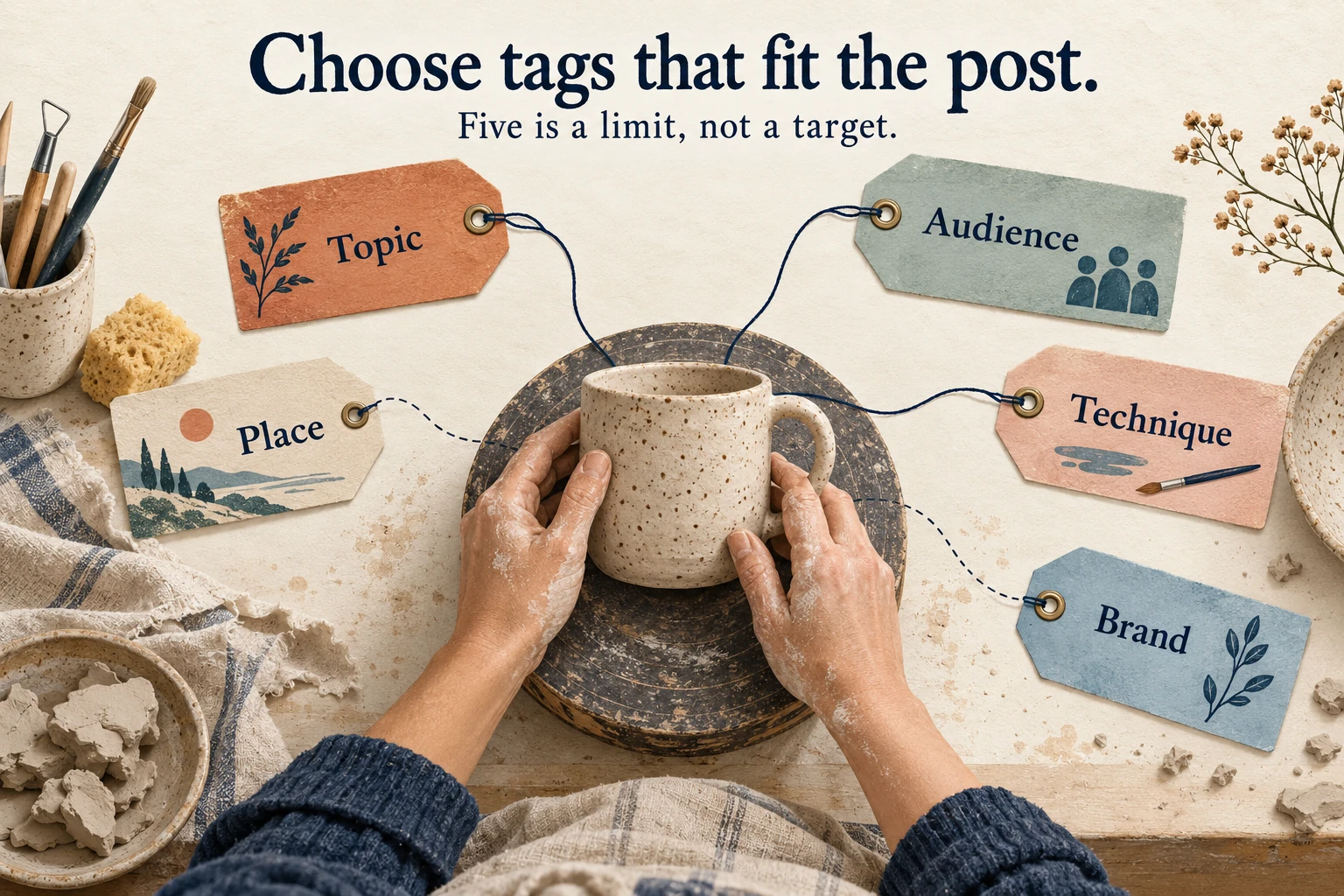
Use these five questions as a shortlist. They are prompts, not a rule that every post needs five different categories.
- Topic: What exactly is shown or explained?
- Audience: Who is the lesson, product or idea for?
- Place: Does a real location matter to this post?
- Technique: Is there a specific process, style or material?
- Brand: Is there a campaign or community label people need?
Check the content behind each candidate
Search for a candidate in Instagram and inspect the available results. Look for the subject, language and audience you intended. The useful question is whether your post belongs with what you see.
For a local workshop, a precise city-and-craft phrase may be more relevant than a global lifestyle tag. For a tutorial, a technique tag may explain more than the town where you filmed it.
Don’t assume the results are a complete, chronological list. What you see is a research sample, not a census of everyone who might discover your post.
Use comparable creators for ideas
Read a few recent posts from creators serving a similar audience. Note the words they use for the subject, recurring questions in comments and tags that describe a specific technique or problem.
Borrow the research direction, then make your own shortlist. Copying a successful account’s full bundle doesn’t copy its audience, reputation, visual quality or distribution.
Choose specificity over an arbitrary post-count cutoff
There isn’t a reliable universal rule that a tag must have fewer than 500,000 posts. A small tag can be irrelevant or inactive, and a large one can accurately describe your work.
I would prioritise a clear match over a particular volume band. If a tool gives a popularity score, treat it as that tool’s estimate, and check what it measures before treating it as evidence of demand.
Keep a small bank by topic
Save separate ideas for tutorials, product details, customer questions and local events. Before each post, choose only the entries that fit.
It’s fine for the same accurate tag to recur across a series. Change a tag when the subject changes, rather than rotating random terms because you think repetition automatically causes a penalty.
Popular hashtags and examples worth adapting
A long list of #Love, #Happy and #Instagood doesn’t tell you which tags suit your post. I would choose a small, descriptive set instead.
The ten scenarios below are original illustrations. Their captions and tag sets are examples to adapt, not popularity rankings, tested combinations or promised results. Check each tag’s current context in Instagram before using it.
1. A ceramic mug being made
Example caption: A close look at how this handle joins the mug. The small details make the shape feel balanced.
Example tags: #CeramicMug #HandBuiltPottery #PotteryProcess
Why these fit: The object, method and process each add useful context. I would keep this set for a making-of post; a finished-product announcement might need a different emphasis.
2. A vegetarian weeknight recipe
Example caption: Chickpeas, tomatoes and one pan. Here’s the order I use so dinner comes together without a sink full of washing-up.
Example tags: #VegetarianDinner #ChickpeaRecipe #OnePanMeals #WeeknightCooking
Why these fit: They describe the dietary category, main ingredient, method and occasion. Use them only when the actual recipe meets those descriptions, rather than adding every popular food tag.
3. A beginner sketching lesson
Example caption: One pencil, three ways to shade a sphere. Start with the lightest layer and build it slowly.
Example tags: #PencilSketching #BeginnerDrawing #ShadingPractice
Why these fit: The skill level and specific exercise matter more here than a general #Art label alone. Someone should be able to tell what the lesson covers before opening it.
4. A London street-photography walk
Example caption: A London photo walk built around reflections: shop windows, puddles and the view from the bus stop.
Example tags: #LondonPhotography #StreetPhotography #PhotoWalk #ReflectionPhotography
Why these fit: Location and visual technique both define this scenario. Substitute the real place and subject; a London tag wouldn’t fit a Manchester walk simply because both cities are in the UK.
5. A small balcony planting project
Example caption: Making room for herbs on a narrow balcony. This arrangement keeps the pots accessible without blocking the door.
Example tags: #BalconyGarden #ContainerGardening #HerbGarden #SmallSpaceGardening
Why these fit: The setting, growing method and space constraint explain the project. I would avoid a broad landscaping tag if the post only shows a few containers.
6. A local café’s pour-over demonstration
Example caption: A slower look at our morning pour-over, from rinsing the filter to the final pour. Which part would you like us to explain next?
Example tags: #PourOverCoffee #CoffeeBrewing #BristolCoffee
Why these fit: For this hypothetical Bristol café, two tags explain the demonstration and one names the local context. Replace Bristol with the café’s actual location, or omit location when it isn’t useful.
7. A spoiler-free fantasy book review
Example caption: A spoiler-free look at this fantasy novel: the writing, the pace and who I think would enjoy it.
Example tags: #FantasyBooks #BookReview #SpoilerFreeReview
Why these fit: Genre and review format set expectations. Add a book-specific tag only after checking the title and existing use; don’t borrow a different bestseller’s audience with an unrelated label.
8. A visible-mending tutorial
Example caption: Turning a worn knee into a stitched patch. Here’s how I position the fabric before the first stitch.
Example tags: #VisibleMending #DenimRepair #HandSewing #MendingTutorial
Why these fit: They identify the material, technique and instructional purpose. The tags describe what the viewer can learn without making a broader environmental claim the post hasn’t established.
9. An acoustic guitar recording walkthrough
Example caption: Two microphone positions, the same acoustic guitar. Listen for how the balance changes when the mic moves.
Example tags: #AcousticGuitar #HomeRecording #MicPlacement #GuitarRecording
Why these fit: Instrument and recording technique are the focus. These labels suit a comparison with audible examples; a performance-only clip would call for a different selection.
10. A seasonal wedding table arrangement
Example caption: Building a low table arrangement with autumn colours, leaving room for guests to see each other across the table.
Example tags: #WeddingFlowers #AutumnWedding #TableArrangement #FloralDesign #WeddingFlorist
Why these fit: This example uses all five slots because the occasion, season, object, craft and professional role are relevant. A hobby arrangement for your kitchen wouldn’t justify the wedding or florist tags.
For me, the useful pattern is the same across these examples: describe what is present, consider who wants it, and leave out labels that need an excuse. Three accurate tags can explain a post perfectly well.
For branded content, pick a distinctive, readable phrase and check its existing use before promoting it. Make it obvious why someone would use it, such as sharing a particular project or joining a real event. A campaign tag gives people a label; it doesn’t automatically give you permission to reuse their photos.
How to assess a trending hashtag
Separate a popular subject from a verified Instagram trend. A large historical post count, a generator’s label or a rising Google search term doesn’t establish that a hashtag is currently taking off inside Instagram.
Read the recent context available to you. Check whether the term refers to a news event, a joke, a campaign or a community with a specific meaning.
I would use an event tag only when the post contributes to that event. If I can’t explain the connection in one sentence, I leave it out. This also helps avoid accidentally attaching a cheerful promotion to a serious topic.
Posts, Reels, Stories and your bio
Posts and Reels
Use the same relevance test for a photo and a Reel. Describe what is actually shown, and make the opening frame or sentence useful to the intended viewer. The verified five-tag limit covers both formats.
Don’t assume every Reel gets priority over every photo. Choose the format that lets you explain or demonstrate the idea well.
Stories
If your Story editor offers a hashtag sticker or supports a text hashtag, use it when it helps explain the Story. Check the controls available in your version of the app.
I wouldn’t hide a stack of tags behind a sticker or promise public discovery from a Story tag. Keep the image and message readable. For a visual walkthrough, see our guide to adding multiple photos to an Instagram Story.
Your bio and square brackets
A bio can explain a community or campaign label visitors may want to use. Keep enough space to say who you are and what your account offers.
Square brackets are not a special hashtag command. A phrase such as [pottery tips] is ordinary text; #PotteryTips uses hashtag syntax. You don’t need to surround a hashtag with brackets, and adding a phrase to your bio doesn’t add that tag to all your posts.
Hashtags, mentions and people tags are different
A hashtag labels a topic. An @mention identifies an account. The people-tagging control associates an account with content. Choose the one that matches what you’re trying to do.
If a collaborator made the mug, credit their account appropriately. That is a separate choice from adding #CeramicMug. Don’t tag unrelated people as a reach tactic.
Do you need a hashtag generator?
No. A notes app and a few minutes of topic research are enough to build a useful shortlist. You can do this on the web, Android or iPhone without installing a dedicated hashtag app.
A generator can suggest vocabulary you haven’t considered. My advice is to ask for a small number of highly relevant ideas, then review each one yourself. Reject irrelevant suggestions, duplicates and any output that exceeds the current limit.
Be cautious about tools that promise instant followers or need your Instagram password just to suggest words. You don’t need an engagement-exchange service for this task. Our guide to spotting fake Instagram followers can help you look beyond the headline follower count.
If you have access to Instagram’s professional dashboard, its Best Practices section is another place to check platform guidance. Meta describes advice covering creation, engagement, reach and hashtags, including tips tailored to account performance.
How to review results without fooling yourself
First, decide what success means for the post. A tutorial might aim for saves and useful questions. A product explanation might aim for profile visits or enquiries. Likes can matter, but they aren’t the only useful outcome.
Keep a simple record: post topic, format, date, caption, tag list and the metrics available to you. Compare posts after the same amount of time, so a month-old post doesn’t automatically beat one published yesterday.
Look across several similar posts before changing your approach. Try a focused adjustment, such as replacing a broad topic tag with a precise technique tag, while keeping the general content format comparable.
Even then, treat the result as a clue. The image, opening hook, posting time, audience and outside shares can all differ. Total reach doesn’t tell you exactly how many people arrived because of one specific hashtag.
If your analytics doesn’t provide reliable hashtag-level attribution, don’t invent it. Record the post-level result and use audience responses to decide what to make next.
A worked example: comparing two similar posts
These numbers are hypothetical. Imagine reviewing two short pottery-tutorial Reels seven days after each was published. Both explain attaching a handle, so the subject, format and observation window are reasonably similar.
Post A’s record: Caption opening: “How I attach a mug handle.” Tags: #Pottery #Ceramics #Handmade.
Post B’s record: Caption opening: “A closer look at attaching this handle.” Tags: #HandBuiltPottery #CeramicMug #PotteryProcess.
| Measure | Post A | Post B |
|---|---|---|
| Accounts reached | 1,000 | 1,200 |
| Saves | 24 | 30 |
| Profile visits | 18 | 20 |
| Saves per 100 accounts reached | 2.4 | 2.5 |
Post B has six more saves, but it also reached more accounts. Dividing saves by reach and multiplying by 100 gives 2.4 for A and 2.5 for B. That puts the raw difference in context; it isn’t proof of a meaningful improvement.
I would record “the more specific tag set is worth trying again,” rather than “these tags caused six extra saves.” The caption openings differ, and the video, posting time, viewers or outside shares could also explain the result.
For the next few comparable tutorials, keep the format and purpose steady and watch whether a pattern repeats. This is an observational comparison, not a controlled experiment. If an insight isn’t available, mark it unavailable instead of substituting zero.
Frequently asked questions
Which hashtags are best for likes and followers?
There is no universal set. Start with words that accurately describe the subject and the audience you want. The example sets above show how to narrow the topic without promising a particular result.
Why can I only add five hashtags?
Five is the published limit for posts and Reels in the official Creators announcement. Follow the composer if it shows a restriction, and prioritise your most relevant choices.
Why aren’t my hashtags bringing views?
Check the syntax and privacy points above first. Then review whether the topic and content match, and whether your expectations rely on an old claim about automatic reach. A quiet post alone doesn’t prove a restriction or a so-called shadowban.
Do Instagram hashtags need square brackets?
No. Start a joined term with #. Brackets aren’t a substitute for that symbol and don’t provide a special discoverability advantage.
Can I reuse hashtags on different posts?
Yes, when they still describe the content. Reassess the list for each post. A consistent series can share a label without every caption becoming an identical bundle.
Will the right hashtags guarantee more followers?
No. A visitor still needs a reason to follow after seeing the post. I would spend at least as much care on your profile’s purpose and your next useful post as on the tag list.
Final thoughts
I would keep this simple: write a caption that makes sense on its own, select the most accurate tags within the current limit, and review what the whole post achieves.
For your next post, choose one clear audience and one clear idea. That makes the hashtag decision easier and gives a new visitor a better reason to stay.